


Quick answer
On 13 September 2026 I ran PageSpeed Insights on the mobile version of urbangoesgreen.com. Performance was 69. After two rounds of fixes, it was 98, with Accessibility, Best Practices and SEO all at 100 and Agentic Browsing at 3/3. The first report is stamped 1:06 PM and the final one 1:59 PM: 53 minutes. The same work on a WordPress or other CMS site usually takes 2 to 3 days to a week.
Why mobile page speed comes first
I have done SEO and web development for more than five years, and mobile page speed is near the top of my technical SEO list every time. It is the issue that affects the most people, because most of your visitors are on their phones.
If the page is slow on mobile, or the buttons and menus are hard to use, people leave. They never call, message or buy. You paid to get them to the site, through SEO or ads, and they drop off before they can become a lead.
So the goal is not just a good number. The page has to load fast on a phone, and every button, icon and form has to work well there.
How long a page speed fix usually takes
On a WordPress or other CMS site, a page speed fix normally goes through a developer or an agency. In my experience that means 2 to 3 days to a week, and published turnaround times back that up:
- WP Speed Fix, a WordPress speed service, advertises a 3 to 7 day turnaround, with consult plans typically finished in 5 to 7 business days.
- A September 2026 WP Rocket roundup of speed optimisation services lists turnarounds from 24 to 96 hours at the fast end to 2 to 10 days depending on the plan.
- For routine website changes in general, small businesses wait 7 to 10 business days on average, even though the work itself takes 20 to 60 minutes. Unclear requests alone add 24 to 48 hours of waiting.
The fix is rarely the slow part. The waiting is: sending the report, explaining the issue, waiting for the developer's queue, reviewing a revision, waiting for it to go live, then testing again.

| Step | Traditional (WordPress, other CMS) | Automated website |
|---|---|---|
| Explain the issue | Email or ticket to a developer, then questions back | Give the PageSpeed report to the AI directly |
| Apply the fix | Waits in the developer's queue | Applied in minutes |
| Revisions | Another round of back and forth | Run again straight away |
| Go live | Wait for deployment | Live within minutes |
| Total | 2 to 3 days to a week | 53 minutes in my test |
What I did, with the time on every report
Every PageSpeed Insights report shows the date and time it ran, so you can check the timeline yourself on the screenshots below.
| Report time | Performance | Accessibility | Best Practices | SEO | Agentic Browsing |
|---|---|---|---|---|---|
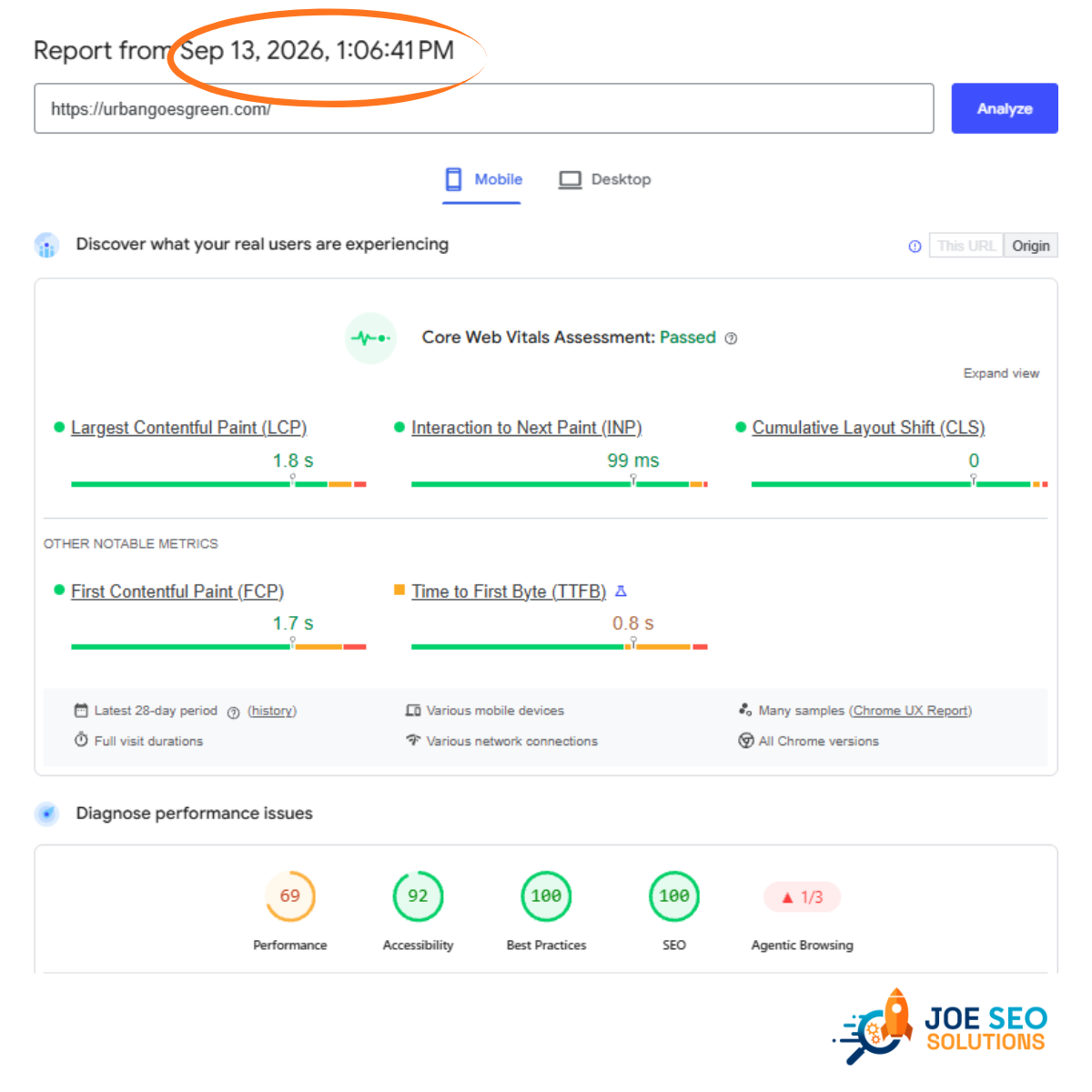
| 1:06 PM, before | 69 | 92 | 100 | 100 | 1/3 |
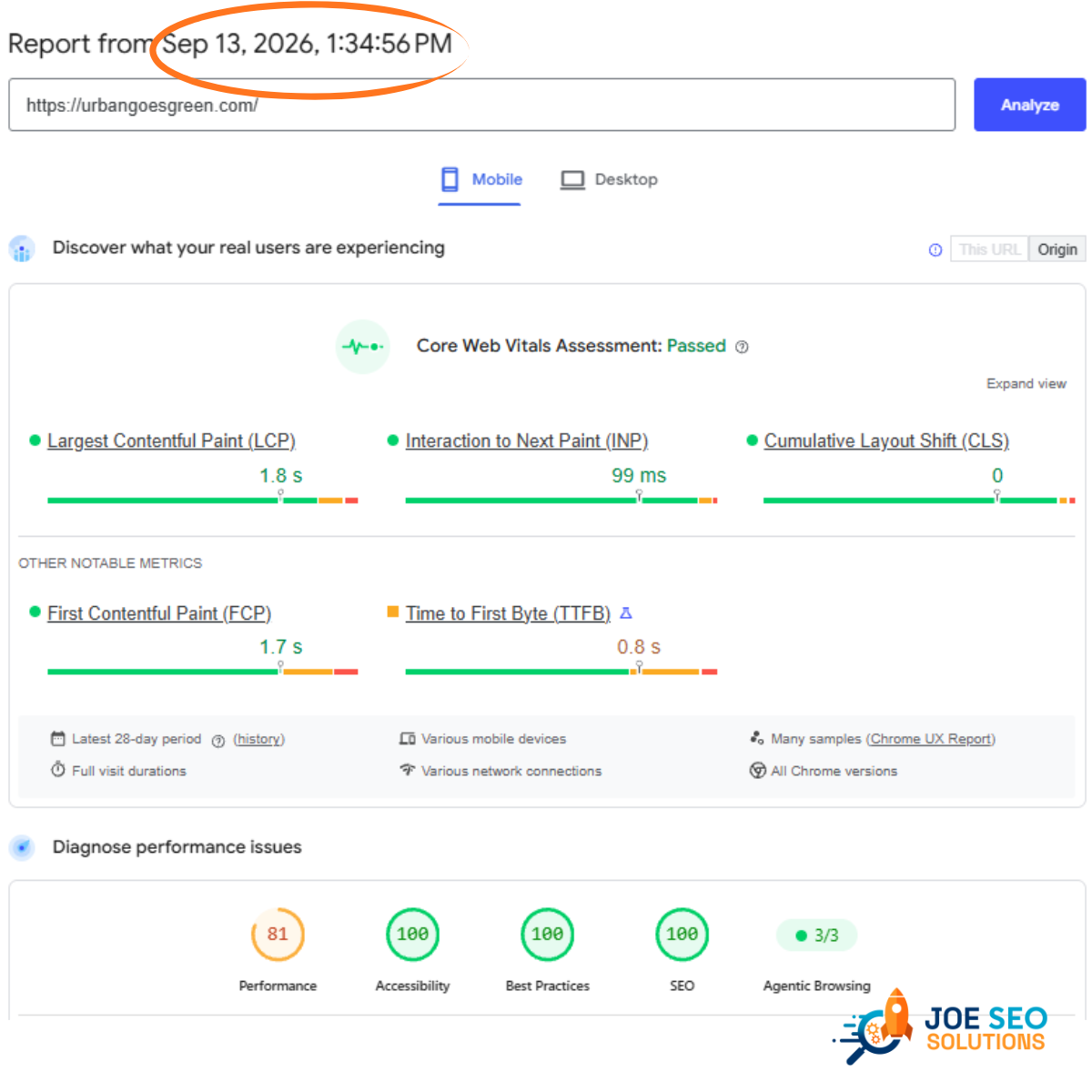
| 1:34 PM, round 1 | 81 | 100 | 100 | 100 | 3/3 |
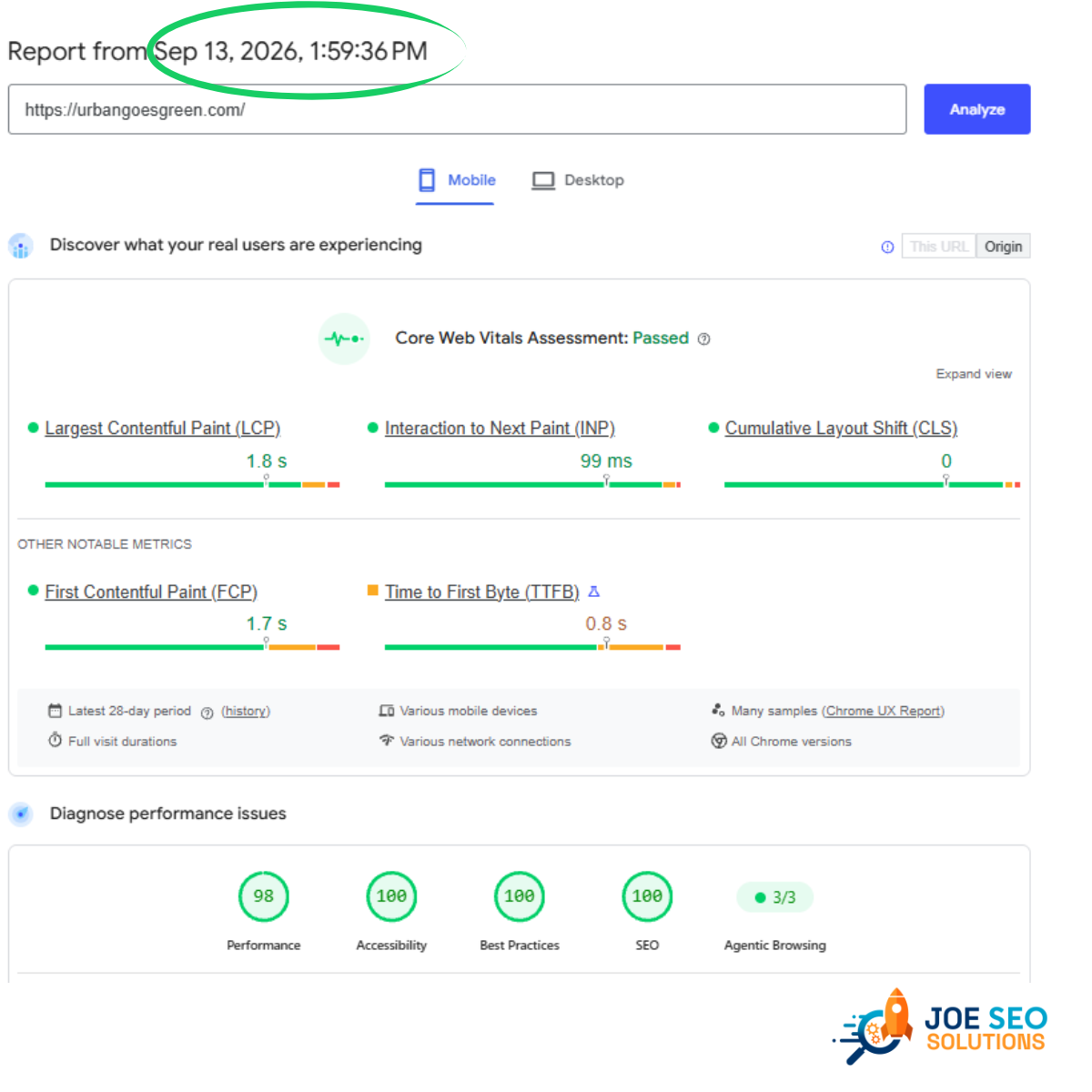
| 1:59 PM, final | 98 | 100 | 100 | 100 | 3/3 |
11:06 PM: run the test and read the starting point
I tested the home page on Mobile. Core Web Vitals already passed, but the lab scores showed work to do: Performance 69, Accessibility 92 and Agentic Browsing 1/3.
21:34 PM: first round of fixes
I gave the full report to the AI that runs the website and had it fix the issues PageSpeed listed. When the changes went live, I tested again: Performance 81, Accessibility 100 and Agentic Browsing 3/3. That took 28 minutes. Better, but I was not satisfied yet.
31:59 PM: second round, all green
I ran the same loop on what was left in the new report. The final test came back at Performance 98 with 100 for Accessibility, Best Practices and SEO. That took another 25 minutes, 53 minutes from the first report to the last.
Core Web Vitals passed already. Why keep going?
The Core Web Vitals box at the top of the report (LCP 1.8 s, INP 99 ms, CLS 0) shows the same numbers in all three screenshots. That is expected. Those numbers come from real Chrome users over the last 28 days, so they cannot change within an hour.
The scores below them are a fresh lab test that runs every time you click Analyze. That is where the fixes show up straight away. A pass means last month was fine. An all-green lab score means there is nothing left slowing the page down today, which leaves room to add pages, images and features without falling behind. If I can make it all green, there is no reason to stop at "passed".
New in PageSpeed: Agentic Browsing
Agentic Browsing is a new Lighthouse category that checks whether AI agents can read and use your page. It is shown as a pass ratio, like 1/3 or 3/3, instead of a score out of 100, and looks at things like a clean accessibility tree, layout stability and an llms.txt file. It went from 1/3 to 3/3 in the first round, because the same fixes that help people using a phone also help AI agents move through the page.
What this means for you
If you are an SEO specialist
Technical fixes are usually where SEO work gets stuck. You find the issue, write it up, and wait for a dev team or a technical person. On an automated website you can fix the issue for your client within the hour and show them the before and after the same day.
If you are a business owner
You don't need several people and days of back and forth to fix one problem. Time is one of the most valuable things in a business, and this is what AI automation looks like in practice: the problem is found, fixed and checked while you are still at your desk.
Want a website that works like this?
SEO-Ready Websites: live in under a week, changes live in under an hour
We build your website on the same setup, with SEO built in, and keep it fast as it grows to 100 pages in 3 months.

Not sure SEO plus automation works?
urbangoesgreen.com is a Metro Manila community initiative, and I automated the whole website. You can see what happened to its Google traffic and calls in the Urban Goes Green case study, or browse all our case studies.
Frequently asked questions
How long does it usually take to fix page speed issues?
On a WordPress or other CMS site handled by a developer or agency, usually 2 to 3 days to a week. Published speed optimisation services quote 24 to 96 hours at the fastest and 5 to 7 business days for a typical implementation, and small businesses wait 7 to 10 business days on average for a routine website change. On an automated website we fixed ours in 53 minutes.
Why does mobile page speed matter more than desktop?
Most visitors reach a business website on their phone. If the page loads slowly or buttons are hard to use on mobile, they leave before they call, message or buy, so the traffic never turns into leads.
My Core Web Vitals already pass. Should I still fix the PageSpeed score?
It is worth it. Core Web Vitals come from real Chrome users over the last 28 days, so a pass shows the past month was fine. The lab score shows what is still slowing the page down today. Fixing it keeps the site fast as you add pages, images and features.
What is Agentic Browsing in PageSpeed Insights?
A new Lighthouse category that checks whether AI agents can read and use your page. It is shown as a pass ratio such as 1/3 or 3/3 instead of a score out of 100, and looks at things like a clean accessibility tree, layout stability and an llms.txt file.
Do I need a developer to get this kind of turnaround?
Not for every fix. With website automation, the report goes straight to the AI that maintains the site, the fixes are applied and the page is live again within minutes. I still review each round and retest before calling it done.