


Quick answer
In Google Analytics, open Admin, go to Product links and click Google Business Profile links. Click Link, choose your Business Profile, click Confirm, then Next and submit. Your report appears under Reports → Business Profile → Overview. You need Editor or Administrator access in Analytics and Owner or Manager access on the Business Profile.
What this solves for a business owner
Most owners check their Business Profile the same way: open the Performance page, look at this month's calls and directions, and close it. The trouble shows up when you try to answer simple questions.
- Are we getting more calls than the same season last year?
- Which months are our peak, and did the changes we made to the profile actually help?
- When calls went up, did website visits and enquiries go up too?
The Business Profile dashboard only lets you look at up to six months at a time, has no side-by-side comparison, and sits on its own, apart from your website numbers. If nobody saved screenshots or downloads from 2024 or 2025, or from when the business started, there is nothing to compare against. You end up guessing whether things are improving.
Linking the profile to Google Analytics fixes the "separate places" part. Calls, direction requests, website clicks, messages and bookings appear in Analytics, next to your website sessions, traffic sources and leads. You can set the date range and compare it with an earlier period on the same card, and see whether a busy month on Maps matched a busy month on your website.
What I saw after linking
Google's help page says Business Profile data in Analytics covers the last 6 months. The live report shows more. When I linked Urban Goes Green on 13 September 2026, Google Analytics showed Business Profile data going back to March 2025, about 18 months, while the Business Profile dashboard itself still only lets you pick six months. Here are both screens from the same profile, on the same day.
Business Profile dashboard vs Google Analytics, side by side
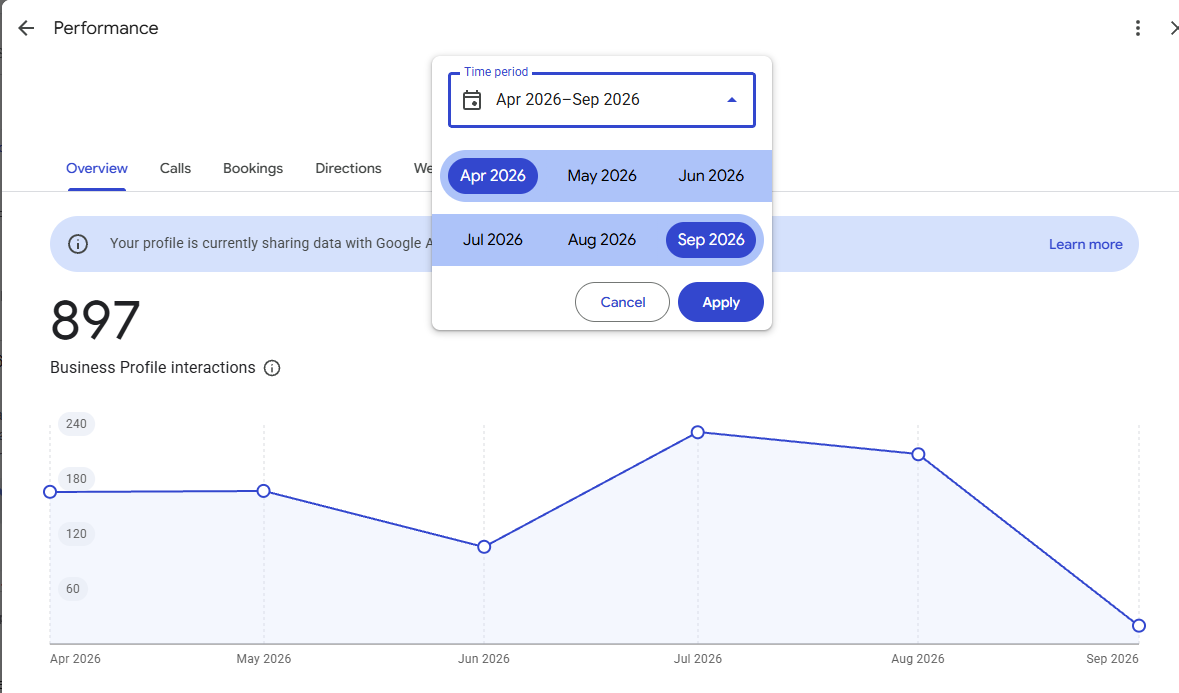
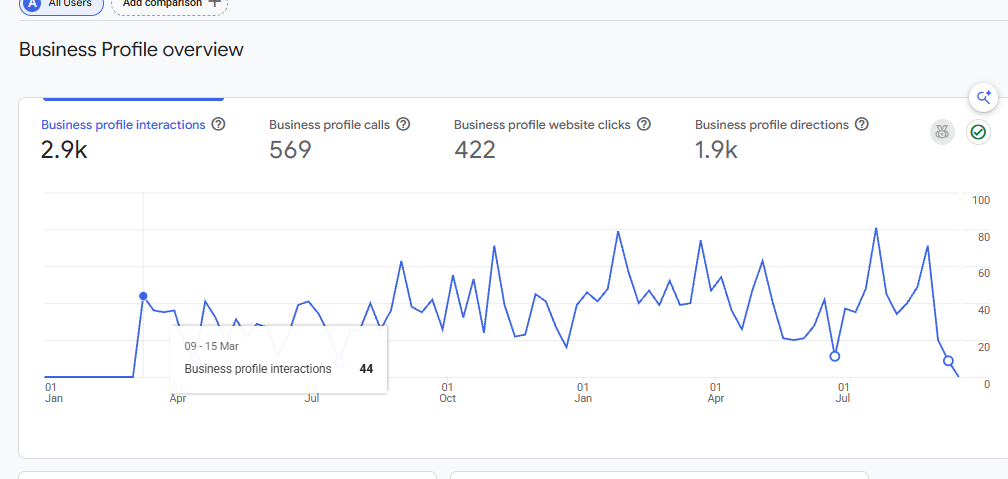
| Same profile, same day | Business Profile dashboard | Google Analytics (linked) |
|---|---|---|
| History you can view | Up to 6 months at a time | About 18 months, back to March 2025 |
| Detail | Monthly points | Weekly points |
| Compare periods | No side-by-side comparison | Compare with an earlier date range |
| Website data | Separate | Same place as sessions, sources and leads |
| Urban Goes Green example | 897 interactions, Apr to Sep 2026 | 2.9K interactions, Jan 2025 to Sep 2026 |
So linking gives you roughly a year and a half of history on day one, enough to find your peak months and compare this year with last. Anything older than that window still isn't available, so set up Admin → Scheduled emails in Analytics to send the overview to your inbox every month and keep your records growing.
Before you start
- A Google Analytics 4 property already tracking your website
- Editor or Administrator role on that Analytics property
- Owner or Manager permission on the Business Profile you want to link
- Ideally the same Google account for both. If they use different emails, add one account to the other first (see troubleshooting below)
Step by step: link your Business Profile to Google Analytics
1Open Google Analytics
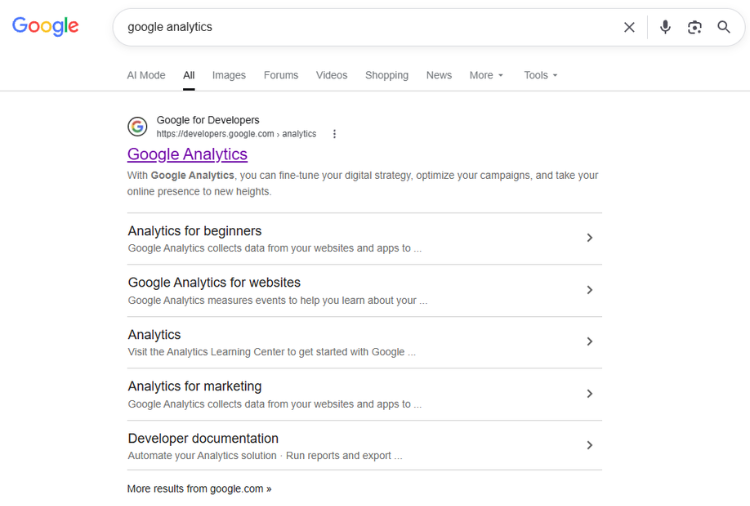
Search for "Google Analytics" on Google, or go straight to analytics.google.com, and sign in with the Google account that manages your website's Analytics.
2Click Admin in the lower left
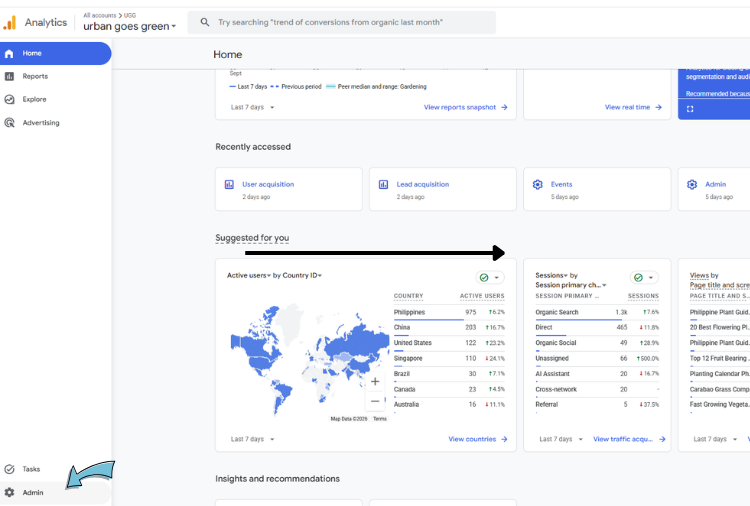
Make sure the right property is selected at the top, then click the gear icon labelled Admin at the bottom of the left menu.
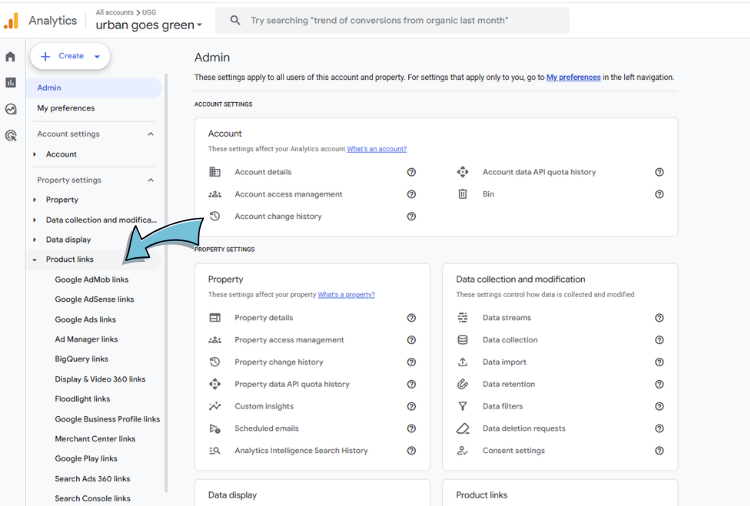
3Open Product links
In the Admin menu, under Property settings, expand Product links. You will see a list of Google products that can connect to Analytics.
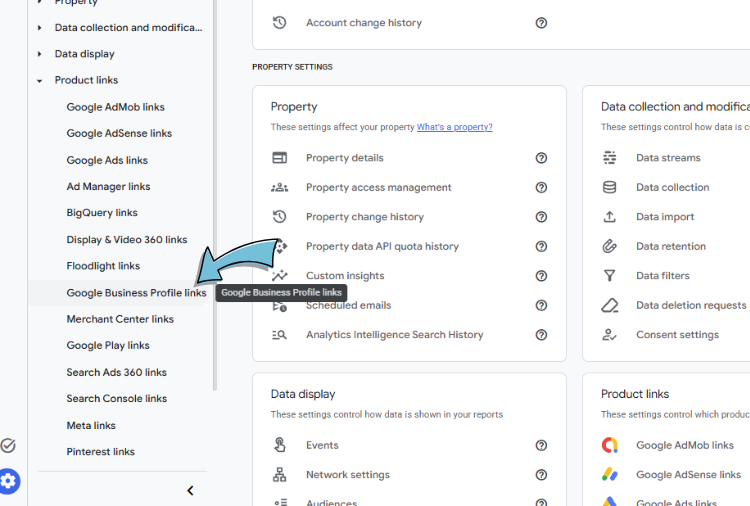
4Click Google Business Profile links
Choose Google Business Profile links from the list, then click the Link button on the page that opens.
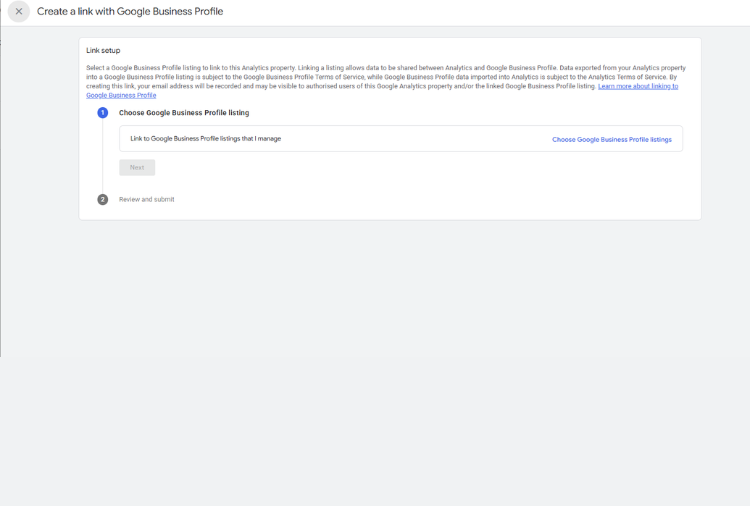
5Click "Choose Google Business Profile listings"
The Create a link with Google Business Profile screen opens. Under step 1, click Choose Google Business Profile listings on the right.
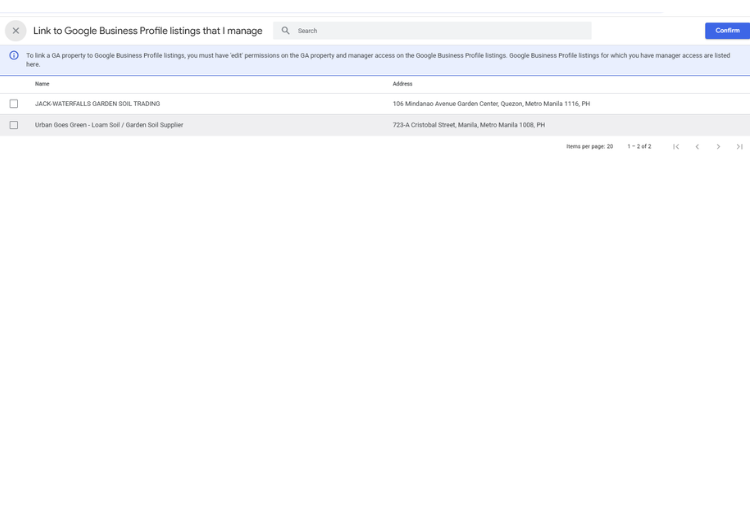
6Tick the right listing and click Confirm
You will see every Business Profile your Google account manages. Tick the one that matches the website in this Analytics property, check the address, then click Confirm in the top right.
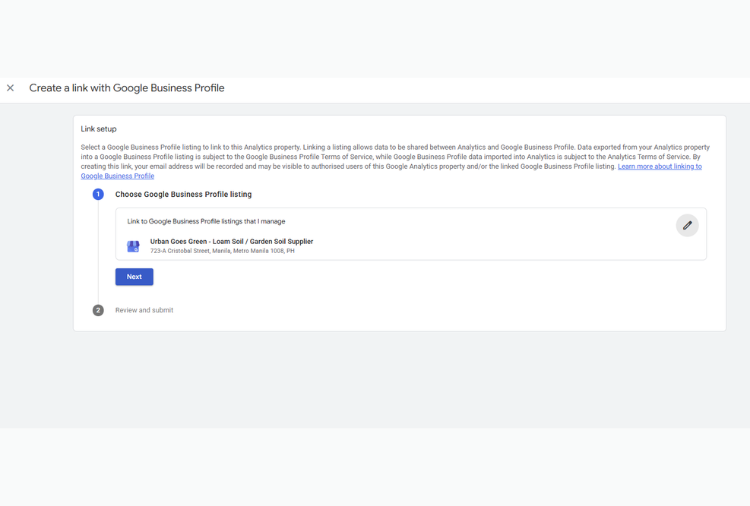
7Click Next, then review and submit
Your chosen listing now shows under step 1. Click Next, read the data sharing note, and submit the link.
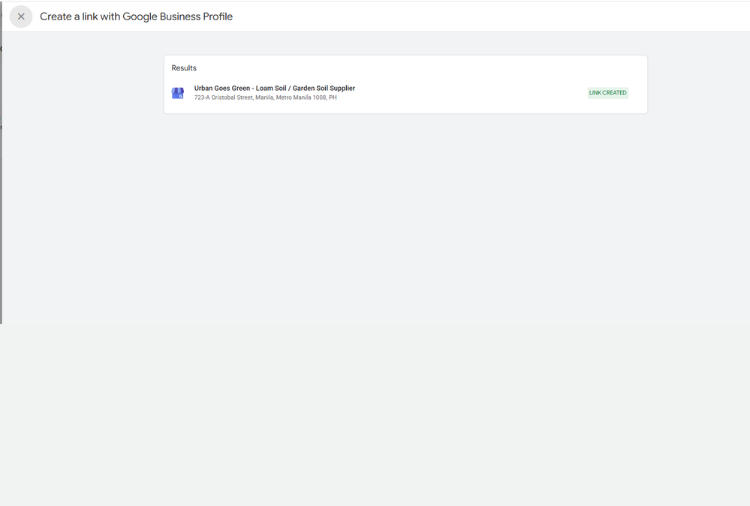
8Check for "Link created"
A green LINK CREATED label next to your listing means it worked. On your Business Profile Performance page you will also see a banner: Your profile is currently sharing data with Google Analytics. Google notes it can take a short while for the data to appear.
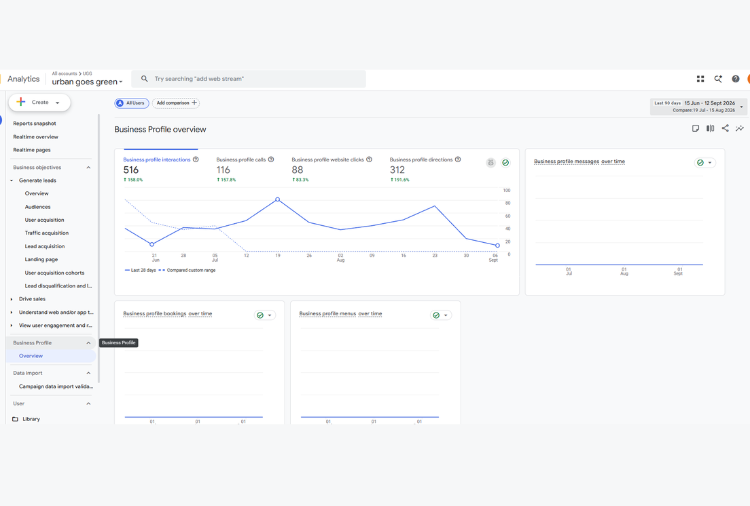
9Open Reports → Business Profile → Overview
Go back to Reports. A new Business Profile section appears in the left menu. Click Overview to see interactions, calls, website clicks and directions over time, plus messages, bookings and menu clicks.
Need help setting it up?
We will connect it with you on Zoom for ₱2,100
One screen-share session. We link your Google Business Profile to Google Analytics together, check the report is showing, and set up the monthly email so your records keep growing past the history Google keeps.
- Before the call: make sure your Business Profile and Google Analytics use the same Google account email
- Different emails? No problem, we help you connect the accounts during the session
What you will see after linking
Google shares these Business Profile metrics with Analytics:
- Interactions: the total of the actions below
- Calls: taps on your call button
- Directions: direction requests to your location
- Website clicks: clicks from your profile to your website
- Messages, bookings and menus: shown for every business, even if you don't use them
Limits to know
- History is limited. Google's documentation says 6 months. My linked account showed about 18 months, back to March 2025. Nothing older than that is available.
- Several locations are added together. If you link more than one profile, you cannot filter the report by a single location.
- No custom reports. Business Profile metrics cannot be used in explorations or filters. Changing the date range and comparing it with an earlier period on the overview works.
- No subproperties. The link is not supported on Analytics subproperties.
Troubleshooting
My Business Profile doesn't appear in the list
The Google account you are signed in with is not an Owner or Manager of that profile. In your Business Profile, open the three-dot menu, go to Business Profile settings → People and access, and add the email you use for Analytics as a Manager. Accept the invite, then repeat step 5.
I can't see Google Business Profile links in Product links
Your Analytics role is probably Viewer or Analyst. Ask the property owner to give your account the Editor or Administrator role, or have them create the link.
The report is empty
Give it a little time after creating the link, then check the date range covers the last few months.
How do I remove the link?
Go to Admin → Product links → Google Business Profile links, select the link, open the menu and choose Delete.
Frequently asked questions
Is it free to connect Google Business Profile to Google Analytics?
Yes. The link is a free built-in feature of Google Analytics 4. You only need the right access on both accounts.
What access do I need to link them?
An Editor or Administrator role on the Google Analytics property, and Owner or Manager permission on the Business Profile. The easiest setup is one Google account that has both.
How much Business Profile history will I see in Google Analytics?
About 18 months. Google's help page says 6 months, but when I linked Urban Goes Green in September 2026, the report showed weekly data going back to March 2025, and wider date ranges kept working. Data older than that window is not available, so a monthly scheduled email is still the way to keep records for the long term.
Why doesn't my Business Profile show up when I try to link it?
The Google account you are signed in with does not have Owner or Manager access on that profile. Add that account as a manager in Business Profile settings under People and access, then try again.
Can I link more than one location?
Yes. One Google Analytics property can link to several Business Profiles, but the report adds them together. You cannot filter the report by individual location.